The operating system for autonomous AI workforces
AI employees that own the work.
Autonomy on your terms.
Give an AI employee a job, KPIs and authority — then let it work.
- Researches, reaches out, qualifies, schedules, publishes, monitors, reports
- Across the systems you already run — no waiting for a prompt
- Approvals where you want them, autonomy when you're ready, visibility always
- Deploys
- in days, not quarters
- Autonomy
- you set when, where, what
- Database
- dedicated, per customer
- Model training
- never on your data
Watch the workforce work
Real dashboards for what matters.
Not activity counts — outcomes, cost and what needs you.
- The product's own executive screens, running live right now
- Every number, prospect, candidate and decision drills down to the work behind it
Pipeline, meetings, cost per meeting — as the workforce produces them.
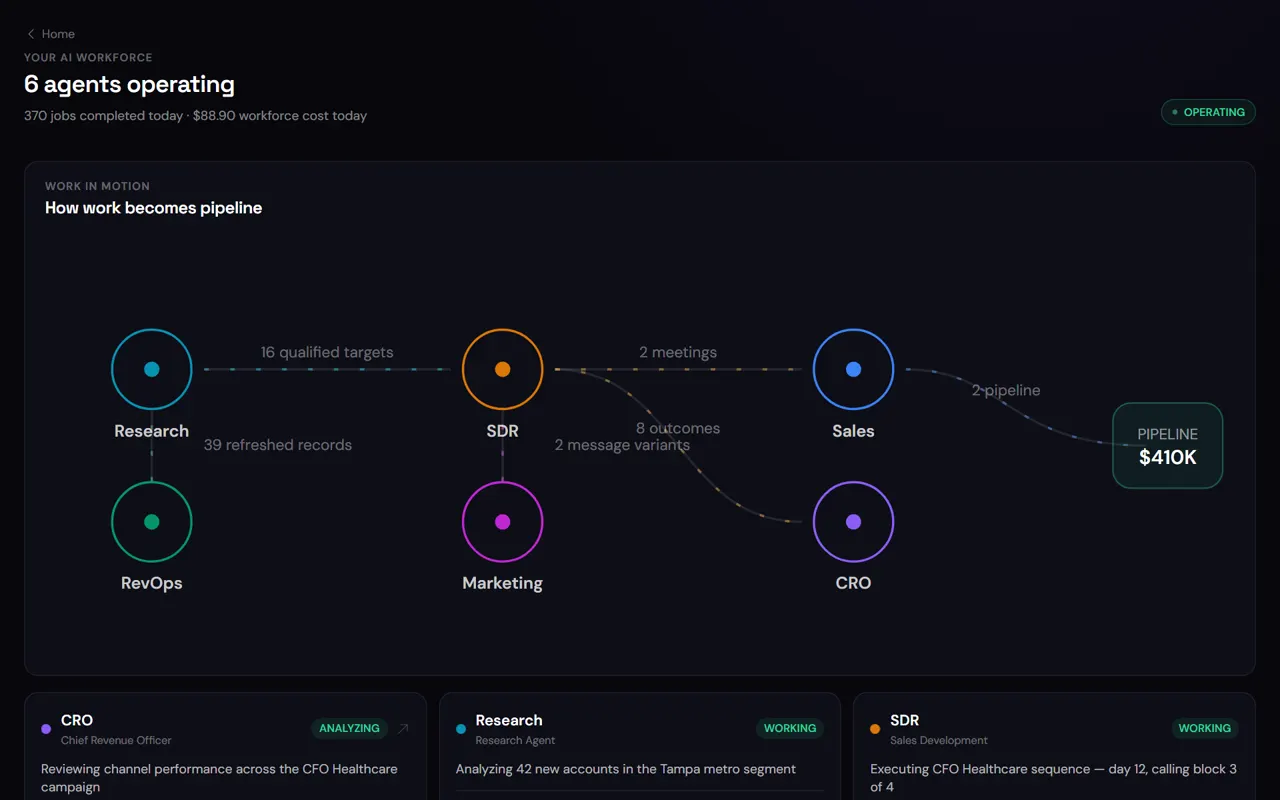
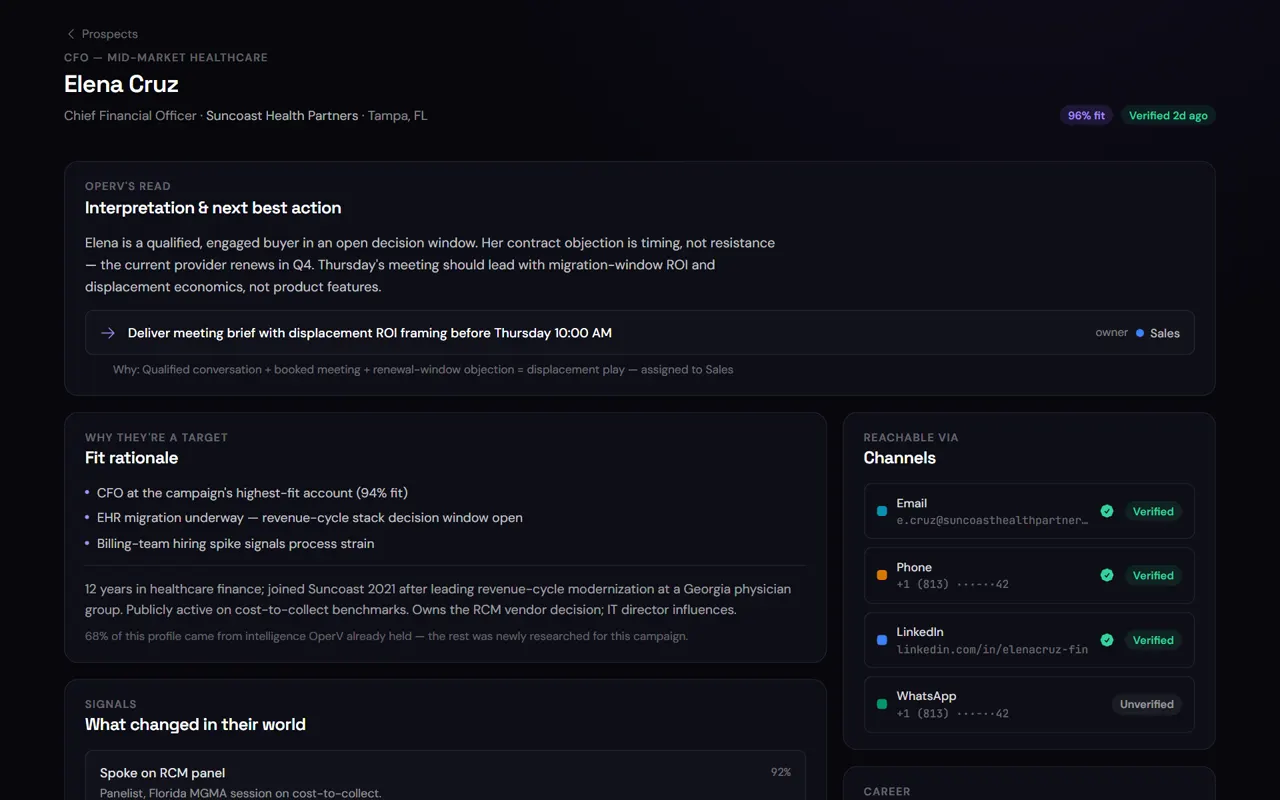
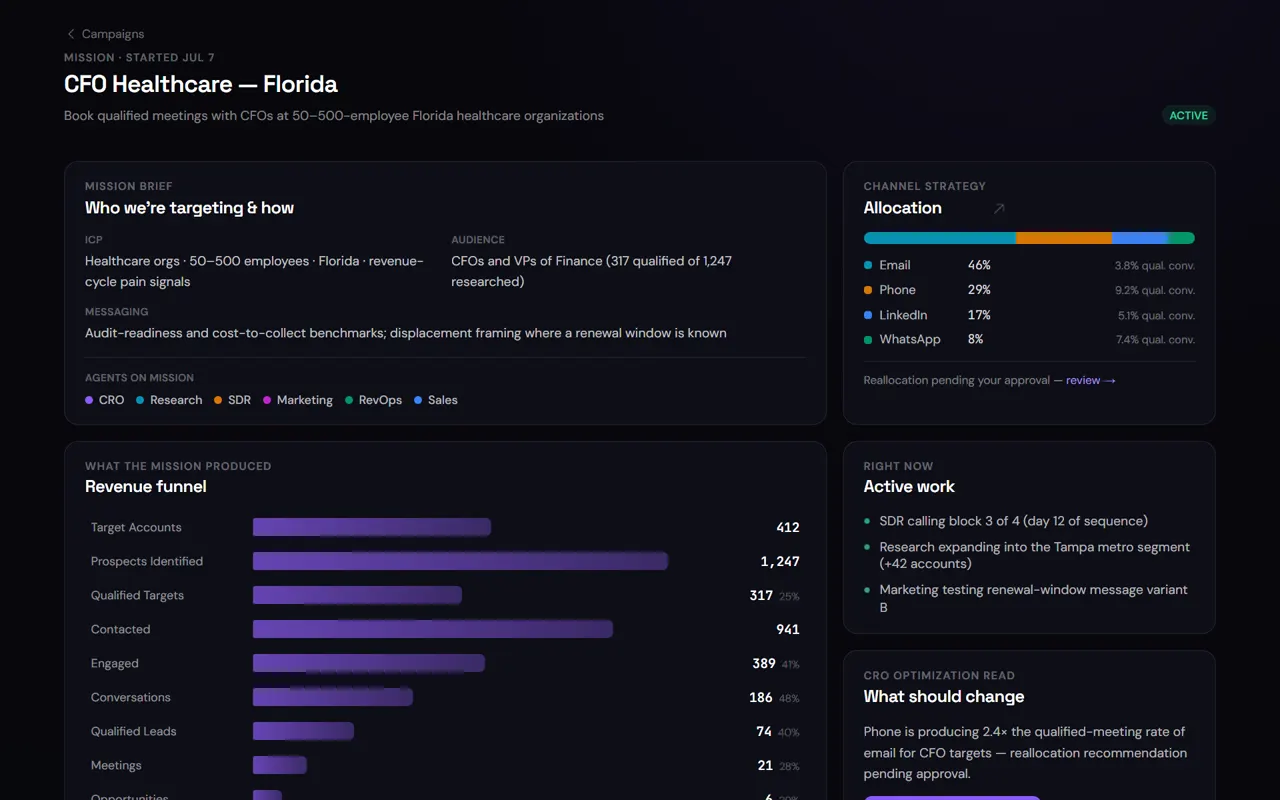
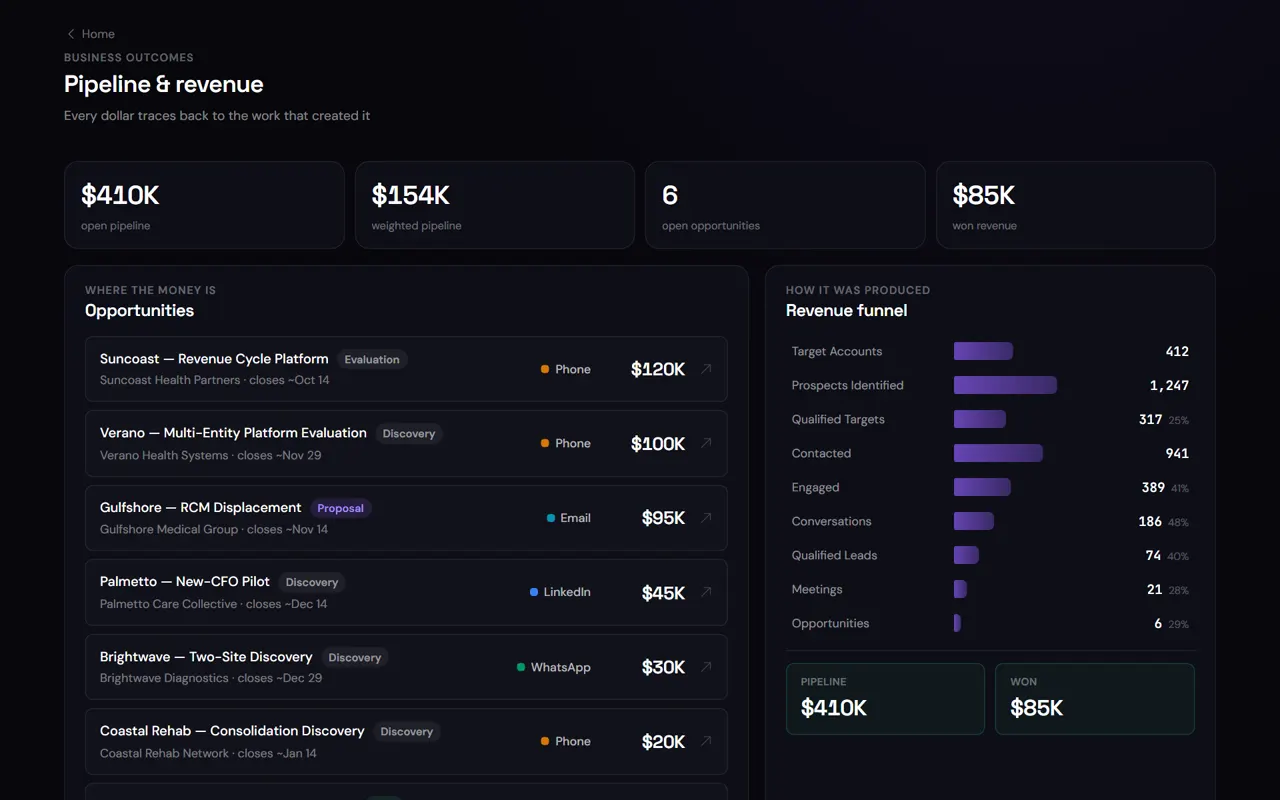
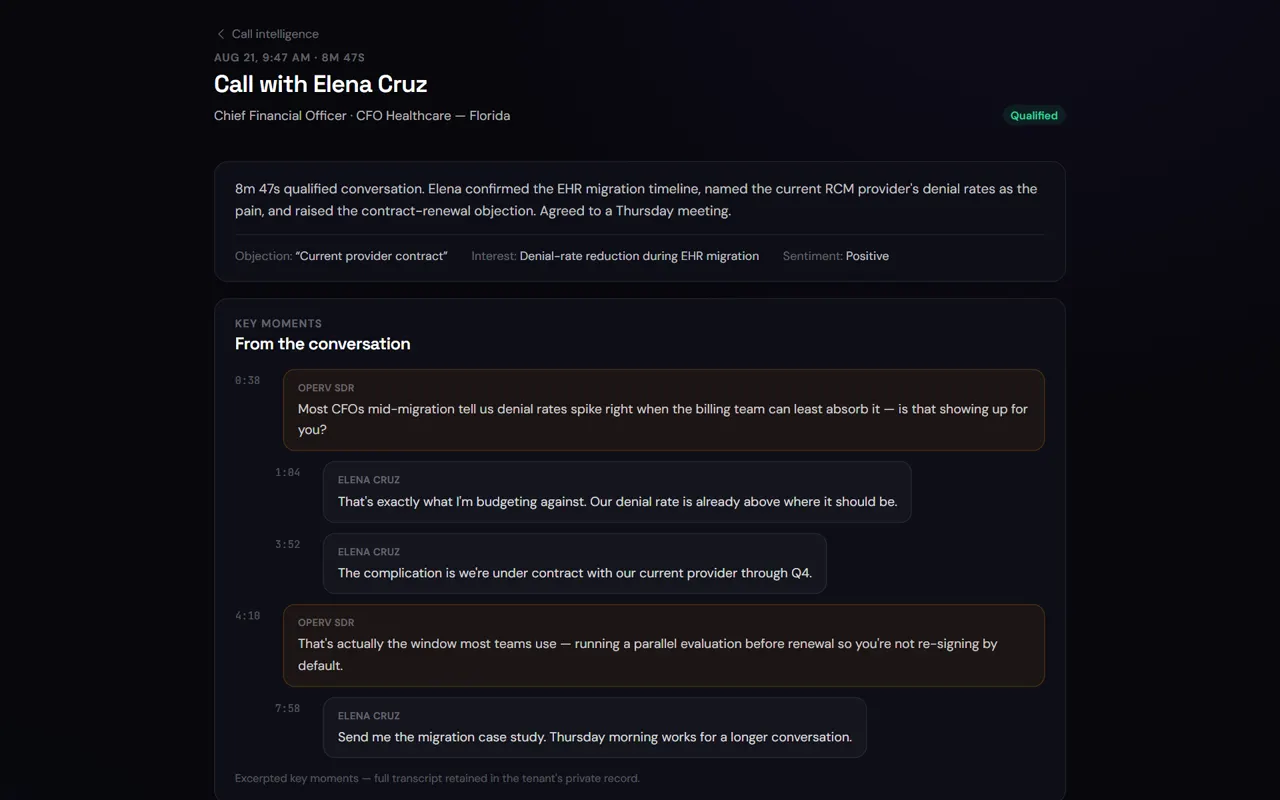
Every number on the dashboard drills into screens like these — in the product.
Candidates found, rediscovered, replied, booked — the funnel moving on top of your ATS.
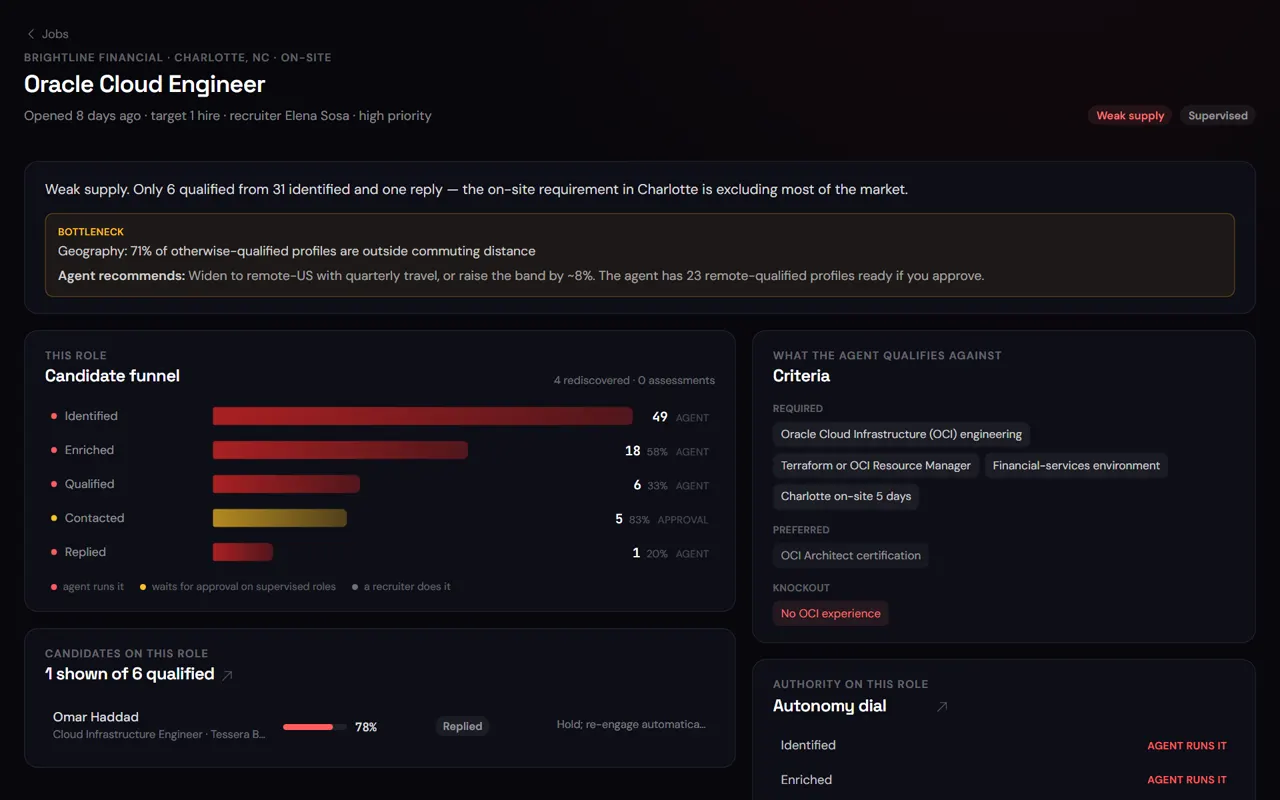
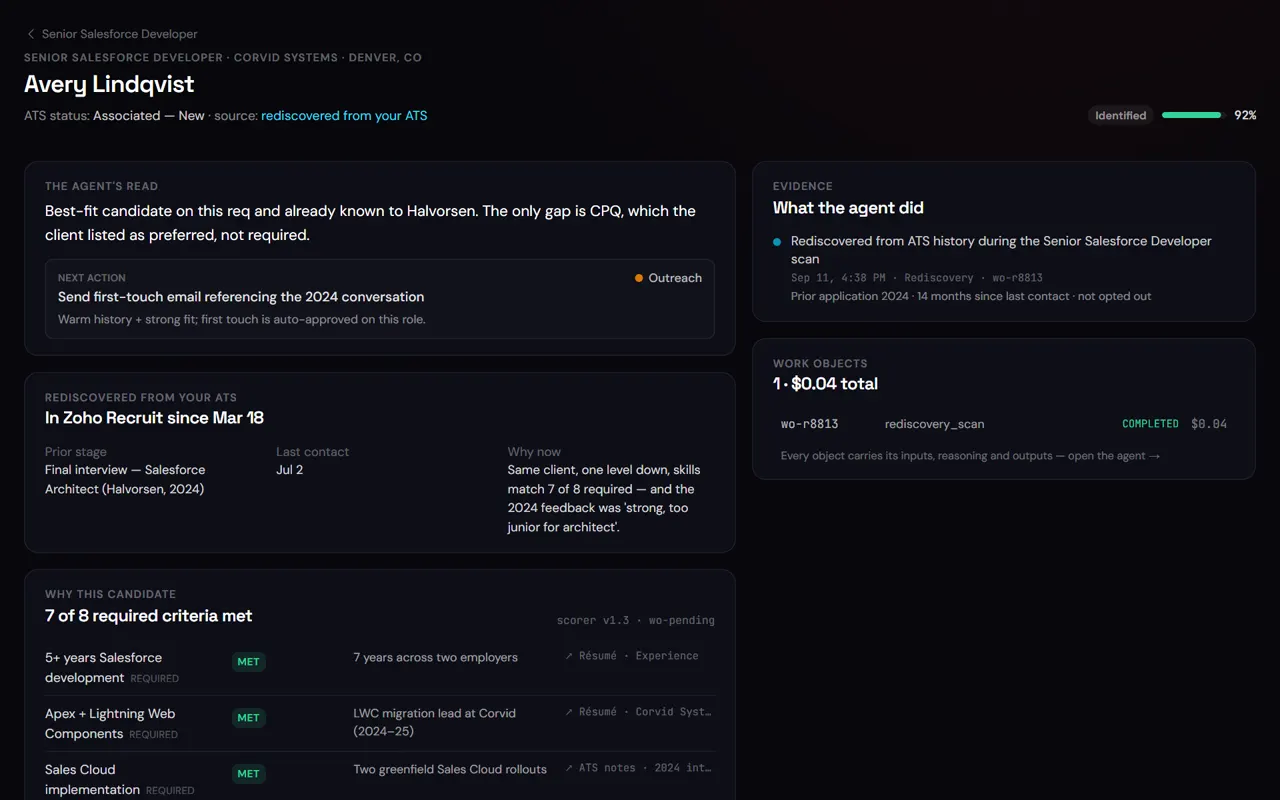
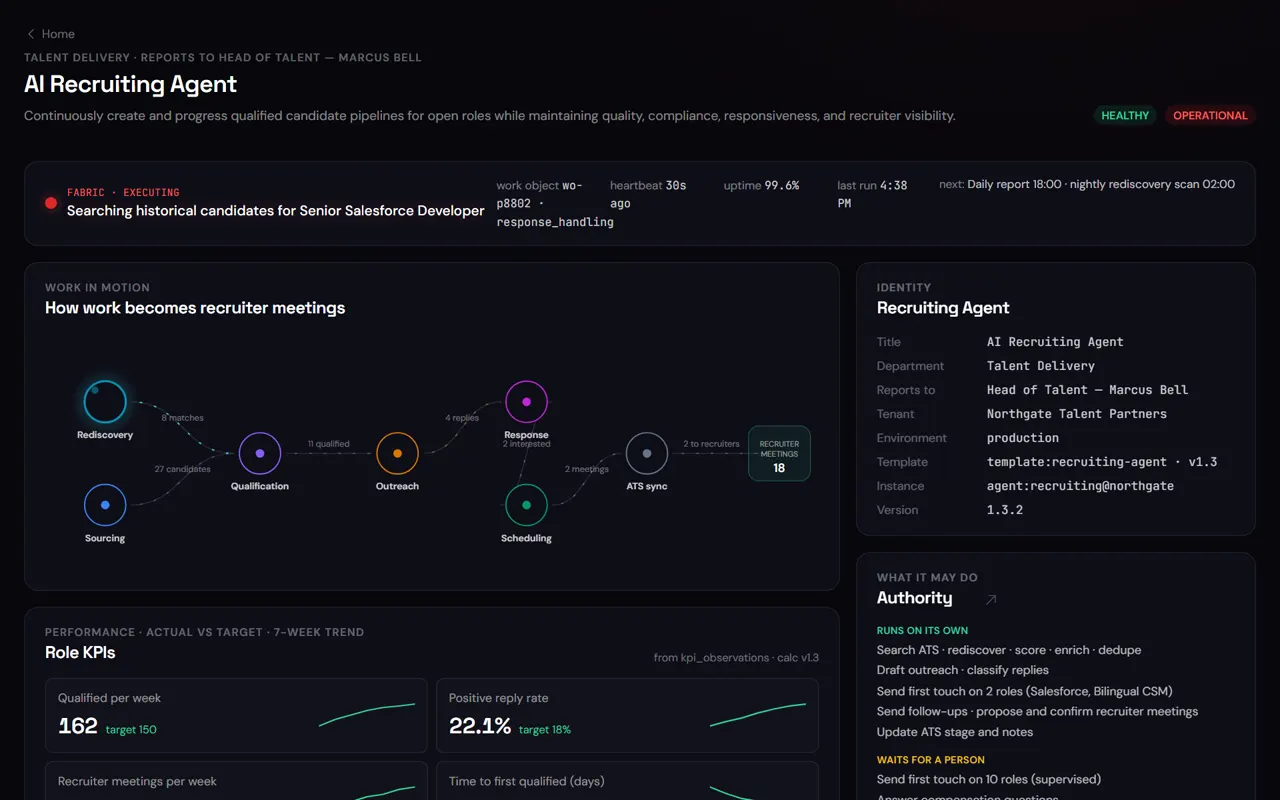
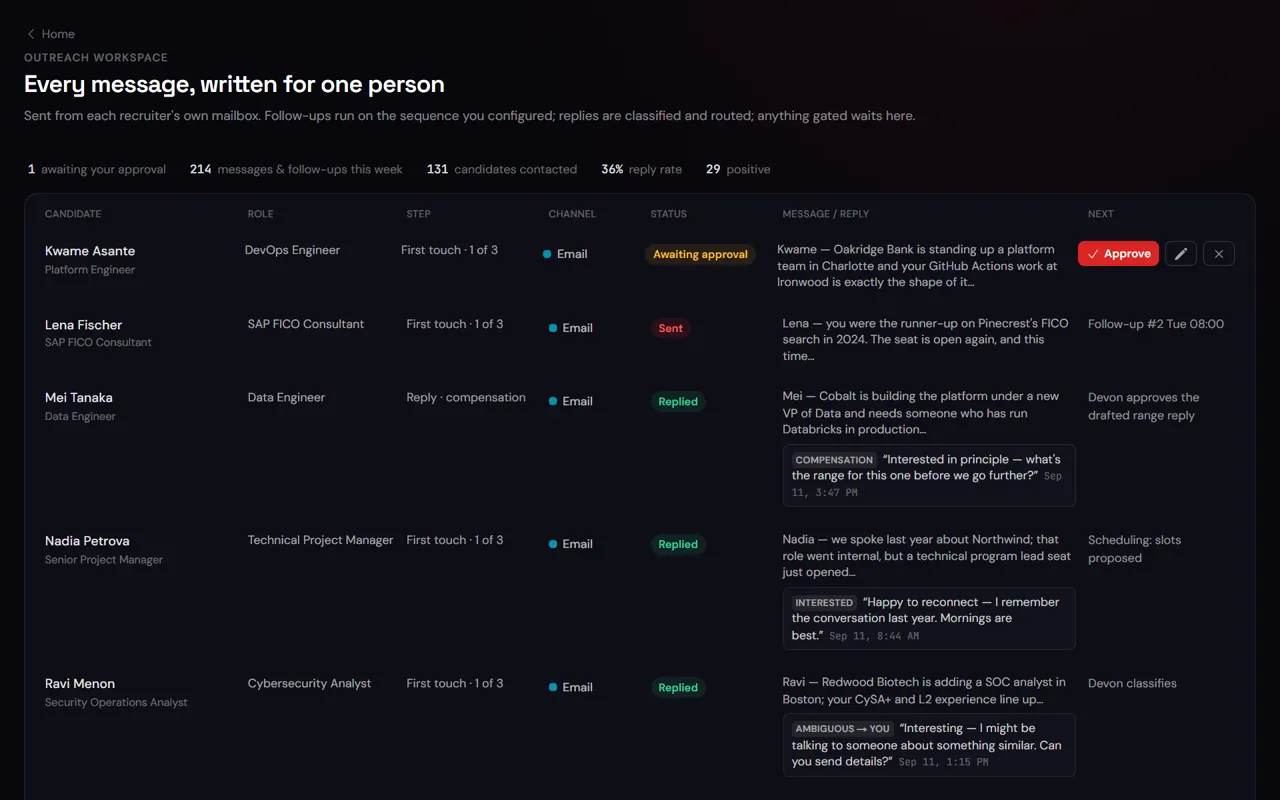
Every number on the dashboard drills into screens like these — in the product.
Live product screens · illustrative workspace data · numbers move as the simulated workforce works · deeper screens are captures from the product
Speed to value
Your first AI employees can be working this week.
Connect the systems. Define the role. Deploy the AI employee.
Connect
Adapters for your CRM, ATS, inbox, calendar, repositories, cloud and observability. Least-privilege scopes you approve; no migration, no custom code.
- Common SaaS connects in a day
- Repositories readable the same day
- Read/write scopes you grant, nothing broader
Typical timeline for a first employee on common SaaS systems · some agents move faster · complex estates take longer, and we say so up front.
Not another copilot
They don’t wait for prompts. They own the work.
Know the difference.
- A chatbot answers.
- A copilot helps.
- An agent performs a task.
- An AxiaForce employee is given a job — and is measured on whether it got done.
Chatbot
Answers a question.
Waits for you to type. Forgets when you close the tab.
Copilot
Helps you do your work.
You still own the task, the follow-up and the update to the CRM.
Agent
Performs a task when asked.
Runs a workflow. Nobody is accountable for the outcome or the cost.
AxiaForce employee
Owns an outcome.
Has a job, KPIs, authority and a schedule. Triggered by events, replies and thresholds — not prompts. Works across your systems, reports what it did and what it cost, and stays accountable to a person.
schedules · business events · new records · incoming replies · missed thresholds · a person
research · outreach · qualify · schedule · update records · publish · monitor · resolve · report
a KPI, a budget, a reporting line and the person who can tighten its authority at any time
See them working
Fabric — what every AI employee is doing right now.
The operating view your team actually runs on.
- Every AI employee around the intelligence core, work flowing between them
- Approvals waiting, outcomes landing
- Recorded from the product — not drawn for the website
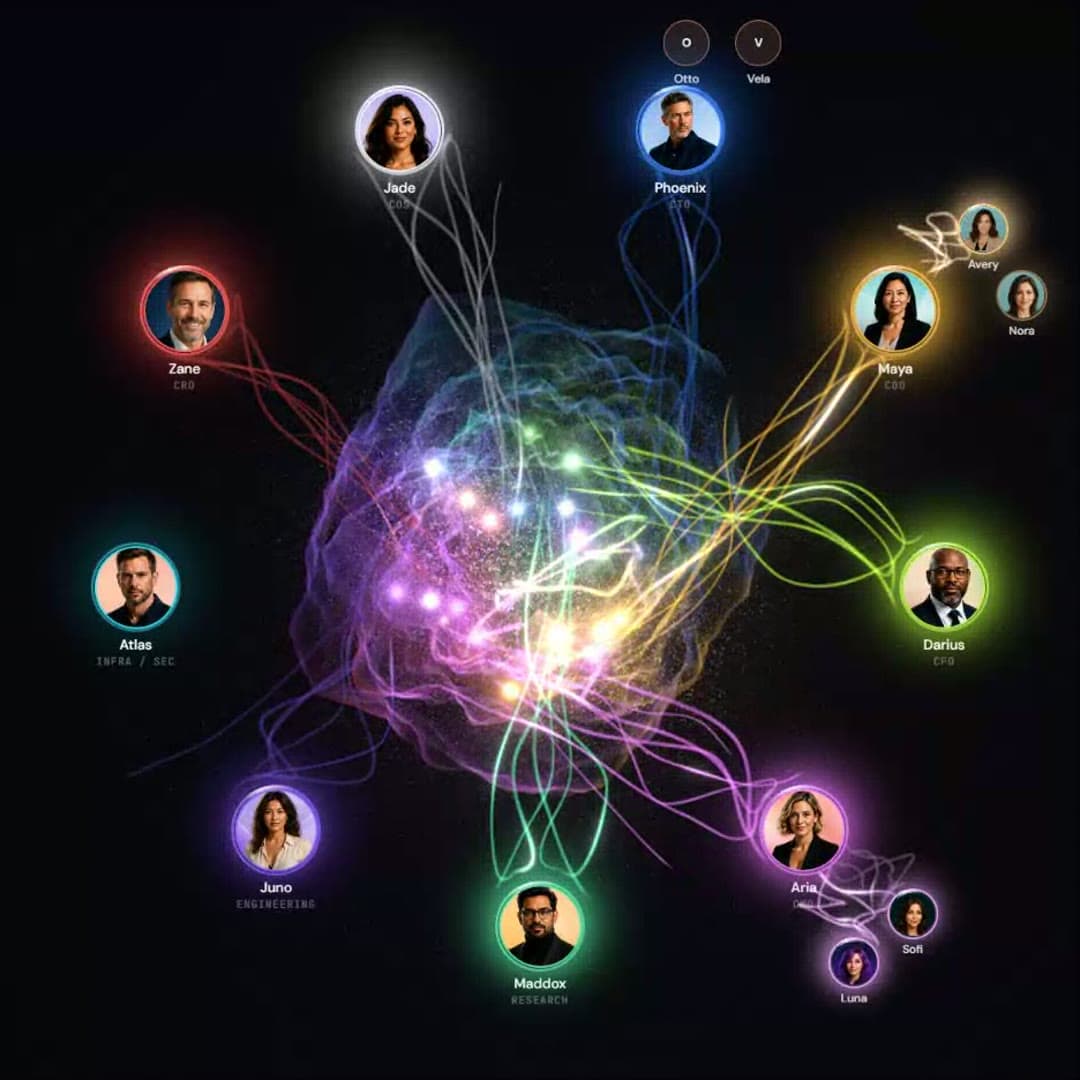
The Command Center’s Living Fabric in demo choreography · illustrative workspace · muted loop
Start with real jobs
Employees with a job to own — not features to configure.
We say what's live, and what isn't — always.
- Two employees are producing outcomes in the product today; the Executive Assistant is in pilot
- Three more are being built on the exact same operating model
- Same Fabric, same scorecard, same authority controls
Enterprise: add autonomous employees to the systems you already own — Salesforce, Workday, Greenhouse, SAP, Microsoft 365 stay the systems of record.
Founders: skip many of those systems and hires entirely — AxiaForce is the lightweight operating layer plus the AI employees. Founders & startups →
Accountability
Every AI employee has a scorecard.
Activity is not the measure. Outcomes are.
- Each employee answers the same questions you'd ask a person on your team
- Every answer is computed from the work itself — not a separate reporting layer
- Job descriptionRole templateAgentTemplate
- EmployeeAI employeeAgentInstance
- Current workFabric — live statusFabric
- Work historyEvery unit of work, with evidenceWorkObjects
- ManagerReporting line & escalationReporting structure
- GoalsKPIs on the AI employee recordKPI contract
- Performance reviewScorecardScorecard
- BudgetCost controls & capsCost controls
- PermissionsAuthority: what waits, what runsAuthority
- Daily updateDaily reportDaily report
- Weekly reviewWeekly reportWeekly report
- Audit trailEvidence on every actionEvidence
One record per employee · persistent · the same shape for GTM, recruiting, marketing, IT and concierge roles
Autonomy with control
Autonomous where you want it. Controlled where you need it.
Every employee has an authority level per action — set where you’re comfortable, per role, per action, per channel. Start supervised: gated work lands in one queue with the reasoning and the evidence, one tap from done. Open the dial when you’re ready and keep the same visibility over everything that runs alone.
- Observe→
- Recommend→
- Draft→
- Act with approval→
- Act automatically
authority levels · budgets · rate limits · systems · actions · escalation — all per employee
- You draw the line — and move it
- Decide which actions run on their own and which wait for a person: first touches, pricing, offers, anything you name. Per role, per action, per channel. Open it up when you’re ready.
- Reasoning travels with every action
- Gated or autonomous, each action carries why the worker did it and the data it used. No black box to trust — a case you can read.
- Governance never switches off
- Autonomous doesn’t mean unwatched. Every action is logged and attributable, limits are deterministic, and you can tighten the dial at any time.
- GTMOutreachFirst-touch policySend first-touch sequence → Meridian Logistics · VP Operations
Matches ICP (3PL, 200–800 staff). Two ops roles posted this month; CRM shows no prior contact.
CRM: no activity 180dCareers page: 2 ops openingsEnrichment: HQ Denver, 410 staff - RecruitingOutreachRe-engagement policyMessage shortlisted candidate → Senior Controller · candidate #4471
92% criteria match. Open to relocation per ATS notes. Last contact 14 months ago — re-engage as warm.
ATS: prior stage = final interviewSkills: 6/6 must-havesAvailability: 30-day notice - GTMReplyPricing policyOffer pricing range in reply → Harbor Health · Director of Talent
Prospect asked for a ballpark. Policy requires approval before any pricing leaves the building.
Inbound: 'what does this cost?'Deal stage: discoveryProposed: standard tier range
Interactive · illustrative data · supervised mode shown — try Approve / Edit / Decline
Integrations
Works with your stack. Writes back to it.
AxiaForce runs alongside the systems you already pay for — nothing to rip out, nothing to replace.
Salesforce, Greenhouse, Workday, SAP, Microsoft 365 — the record lives where it lives. Every employee action is written back to it with the work-object id.
Each adapter asks only for the permissions the job needs. You see the list before you grant it, and revoke one without touching the rest.
GitHub, CI/CD, cloud, databases, logs — technical employees connect to where the work already lives, under the same authority model.
Marks and names are trademarks of their respective owners, shown to indicate compatibility only; no endorsement implied.
Examples by category · confirm the launch list with sales
Security & data architecture
Your AI workforce operates inside your boundaries.
Most AI tools are one shared app with a customer ID on every row.
- AxiaForce provisions each customer their own environment
- Your AI employees touch your pipeline, your candidates, your systems of record
- Enterprise-grade architecture, built for teams without an enterprise budget
- dedicated domain
- dedicated database · db-acme
- own keys · own secrets
- region us-east
- dedicated domain
- dedicated database · db-harbor
- own keys · own secrets
- region us-west
- dedicated domain
- dedicated database · db-your-co
- own keys · own secrets
- region eu-west
Your own database and environment — and your own domain where applicable. Not a row-level flag in a shared table.
System credentials are encrypted per tenant and used only by that tenant’s employees, with the scopes you granted.
Models are prompted with your context at run time through controlled platform interfaces and are never fine-tuned on it. No cross-customer learning.
Authority decides which actions wait for a person and which run alone — per role, per action. Conservative by default; you open it up deliberately and can tighten it any time.
Inputs, reasoning, outputs, who approved what — timestamped, attributable to an AI employee and a work object, exportable.
AI employees get the scopes a workflow needs and no more. Revoke one adapter without touching the rest.
Company info you share — logos, marketing materials, tone, price plans, live job listings — becomes the guardrails an AI employee operates inside, so automation matches your brand and your culture instead of a generic default.
Built by a founder, for founders
Scale with AI before you scale overhead.
AxiaForce was built by a serial entrepreneur running multiple companies with AI — because at some point the operating overhead had become the job.
- You’re selling.
- You’re hiring.
- You’re marketing.
- You’re building the website.
- You’re answering prospects.
- You’re managing vendors and spend.
- You’re managing the technology.
- You’re tracking three entities.
- Eventually, the operating overhead becomes the job.
So: an AI workforce, plus the lightweight operating system required to manage it — from the website to the back office. Enough infrastructure to run your companies without assembling a bloated enterprise stack.
AxiaForce can replace many of the systems and roles you haven’t hired or bought yet.
- Website + AI concierge that answers, qualifies and books
- Lightweight CRM, pipeline and a GTM employee
- Recruiting employee on top of your ATS — or instead of one
- Marketing employee for content, social and comments
- Vendor, subscription and spend tracking
- IT employee: software, incidents, documentation, audit evidence
- Multiple companies / LLCs — clean separation, one roll-up view
AxiaForce works across the systems you already own.
- Adapters into Salesforce, Workday, Greenhouse, Bullhorn, SAP, NetSuite, Microsoft 365
- Autonomous capacity inside the systems you already run
- Dedicated database and environment per customer
- Authority, approvals, rate limits and audit evidence
- KPI accountability per employee, per workflow
- Days to deploy, low change-management burden
Early customers
We’re onboarding our first five customers now.
Built by an operator, sold to people who run companies like the ones building it. No polished customer quotes yet — because we’d rather show you the real scorecard once the first month closes than write one for you. If you want to be one of the first five, this is the moment.
ROI
Not novelty. Capacity and value.
Two inputs give you a first estimate. The full calculator covers all five AI employees, with every assumption visible and yours to change.
Getting started
Start month-to-month. Earn the annual rate.
Watch the scorecard first. Commit once it's proven.
Sign up month-to-month
No annual commitment to start. You're on a monthly plan from day one — cancel any time before you've decided this is working.
- No long-term contract required
- Ordinary monthly invoicing
- Start with one employee
Pay for the workforce you’re running — not a seat count.
Add an AI employee when you need one. Reduce or pause one that isn’t earning its keep. Changes take effect on your next monthly cycle, not at renewal.
Next step
Start with one employee. Build a workforce.
Thirty minutes, your systems, one job end to end. You’ll leave with a clear picture of what runs on its own, what waits for you, what it costs and what it’s worth — and a first employee that can be working this week.
- 1 employeeGTM — or the website concierge
- 3 employeesGTM + Recruiting + IT
- 5 employeesadd Marketing + Operations
- 10+revenue, talent, marketing, operations, finance, technology